
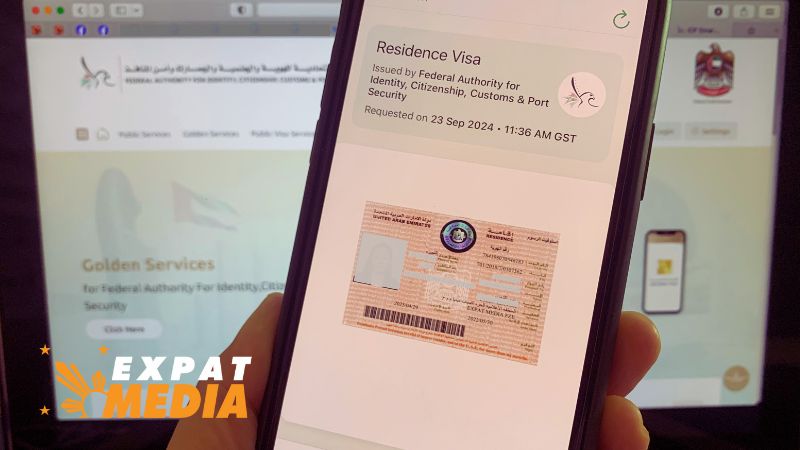
A digital copy of a residence visa issued in the UAE. EXPAT MEDIA
Residents of the UAE no longer need a physical residency visa sticker on their passports, but downloading a digital copy of your visa is still essential for keeping track of your status. Here’s how you can easily access a digital version of your visa, which includes important details like your file number, sponsor information, and expiration date. The UAE government replaced the traditional visa stickers with enhanced Emirates IDs in 2022 as part of a broader initiative to streamline services. Residents can now use their Emirates IDs and passports to pass through immigration, with airlines equipped to verify residency status using these documents. Downloading a copy of your visa is simple. Residents can use the ICP Smart Services app or the official website. Once logged in with your UAE Pass or registered email, just follow the prompts to download the visa as a PDF. This digital copy can be saved for offline use, making it easy to access when needed. For those who prefer a physical document, the UAE offers an option to print a stamped version of the visa. This service can be requested online through the ICP website for a fee of Dh250 and is typically completed within two working days.How to download UAE residence visa: A step-by-step guide
With the UAE’s shift towards digital services, residents no longer need physical residency visa stickers on their passports. Instead, all necessary visa details are integrated into the Emirates ID, which now serves as the primary document for residency verification. However, you can still easily download a digital copy of your UAE residence visa through official channels for your personal records, online transactions, or service applications. Here’s a detailed guide on how to download your UAE residence visa from the Federal Authority for Identity, Citizenship, Customs and Port Security (ICP) using their app or website.Step 1: Download the ICP Smart Services app
To begin, download the ICP Smart Services app from the Apple App Store or Google Play Store. This app is user-friendly and allows you to access various services, including downloading your UAE residence visa in digital form. Search for: "ICP Smart Services" or "UAEICP" Compatible devices: iOS and AndroidStep 2: Log in with UAE Pass or create an account
Once the app is installed, log in using your UAE Pass. If you haven’t created a UAE Pass yet, you can register by following the app's prompts, or you can create a new account using your registered email address. Option 1: Log in using UAE Pass Option 2: Register with a valid email and mobile number if you don’t have a UAE PassStep 3: Access the visa page
Once logged in, navigate to the "Documents" section located on the bottom menu of the app. Here, you’ll find your digital Emirates ID and your UAE residence visa in a wallet format. If you are sponsoring dependents, their visa details will also appear automatically under your profile. Click on: "Documents" View: Your Emirates ID and residence visa information If your latest Emirates ID or Residence Visa have not yet been added in the app, you can click on "Request a document". This will take you to the list of UAE Government agencies. Click on "Federal Authority for Identity, Citizenship, Customs and Port Security" and Click on "Emirates ID card Request" or "Residence Visa Request" or both.Step 4: Download your visa as a PDF
After locating your visa details in the app, download a PDF copy to your device for easy access. This copy will include essential visa information like your file number, unique ID, sponsor name, and visa expiration details. Click on: Your residence visa in the wallet Download as: PDF file to save on your mobile device or desktop Tip: You can save this document for offline use, allowing you to access it anytime, even without an internet connection.Step 5: Download your visa via the ICP website
Alternatively, you can also download your visa from the ICP website. Here’s how: Visit the ICP Smart Services website: https://icp.gov.ae Log in using your UAE Pass or registered email Navigate to the "Cards" section or search for "Visa Services" Select the residence visa document you wish to download Download the PDF for personal useStep 6: How to obtain a printed, stamped copy of your UAE visa
If you require a printed, stamped version of your UAE residence visa, the ICP Smart Services website offers this service for a small fee. This might be necessary for certain legal or administrative procedures. To obtain a printed visa document: Visit the ICP Smart Services website and log in. Select "Public Services" from the top menu bar. Click on: "Reports" from the next dashboard. Choose the service: "Residence Details – Print." Enter your visa details, which could be one of the following: visa file number, unified number, or Emirates ID number. Pay the fees of Dh250. Your printed, stamped visa will be processed and available for pick-up or delivery within two working days. You can also request this service through a nearby Customer Happiness Centre. The ICP app provides location details for the nearest center if you prefer to process it in person. ICA/Expat MediaFor all the latest news from the UAE and the world, follow us on Facebook, Twitter and Instagram and subscribe to our YouTube page












Comments
Leave a Comment